How to use TowTide
Five minutes of setup, then it works the way you run the boat.
1. First launch
- Install TowTide from the App Store or Google Play.
- Read the Before you use TowTide notice and tap I understand — not for navigation.
- Pick a monthly or yearly TowTide Pro subscription. First-time subscribers get the first month free on the monthly plan. Already subscribed on this Apple or Google account? Tap Restore purchases.
- The app opens on the CURRENT tab. The LOCKS tab is at the bottom right.
2. Set up your tow
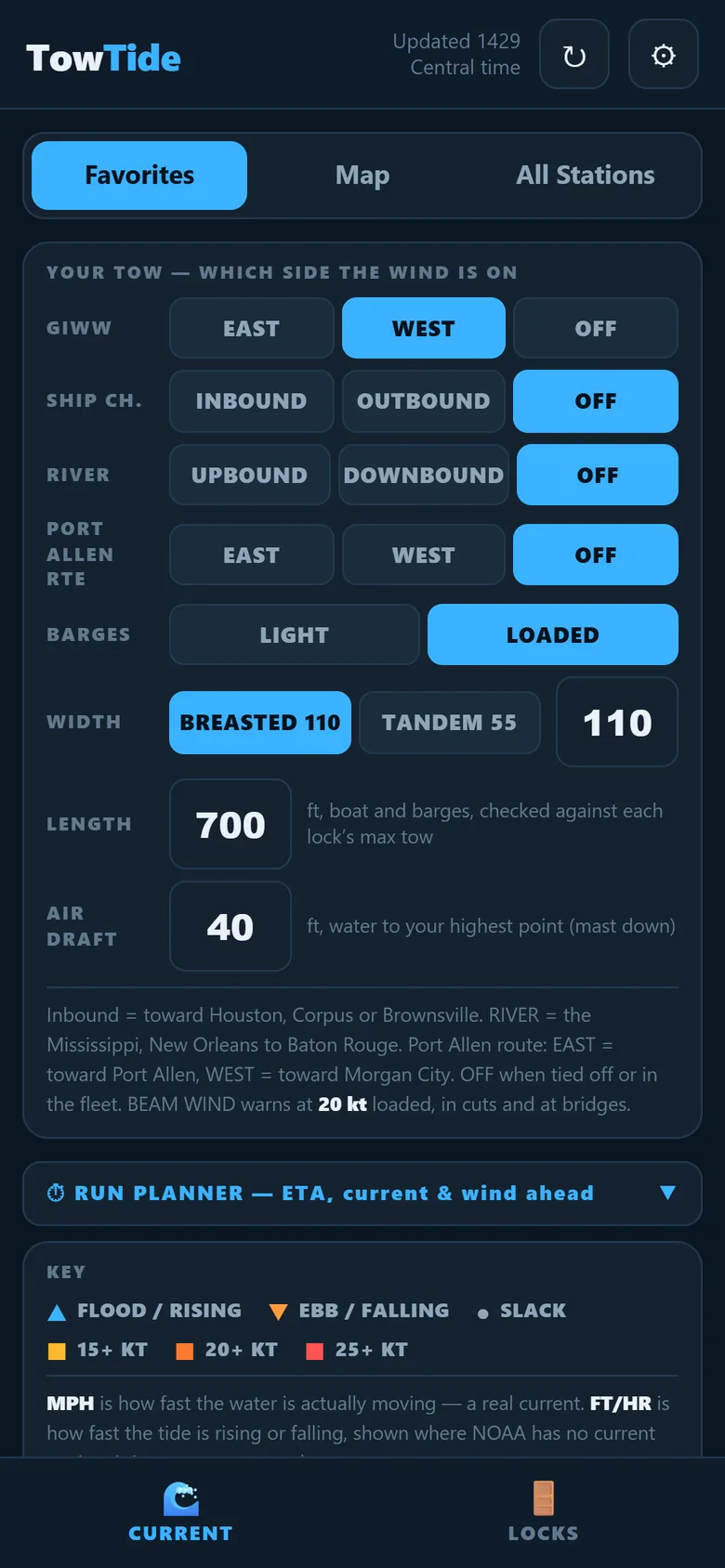
The YOUR TOW panel tells TowTide which way you are headed, so it can say which side of the tow the wind is on.
- GIWW: tap EAST or WEST. Tap OFF when you are tied off or in the fleet.
- SHIP CH.: INBOUND is toward Houston, Corpus or Brownsville.
- RIVER: UPBOUND or DOWNBOUND on the Mississippi.
- PORT ALLEN RTE: EAST is toward Port Allen, WEST toward Morgan City.
- BARGES: LIGHT or LOADED. Light barges catch more wind, so the beam-wind warning comes on sooner.
- Optional: set your tow width, length and air draft. TowTide checks them against each lock's limits.
3. Star your stations
- At the top of the CURRENT tab, tap All Stations or Map.
- Tap the ★ on a station, or tap a station on the map, to add it to your Favorites.
- Go back to Favorites. Your stations stay at the top in the order of your run.
4. Read a station card
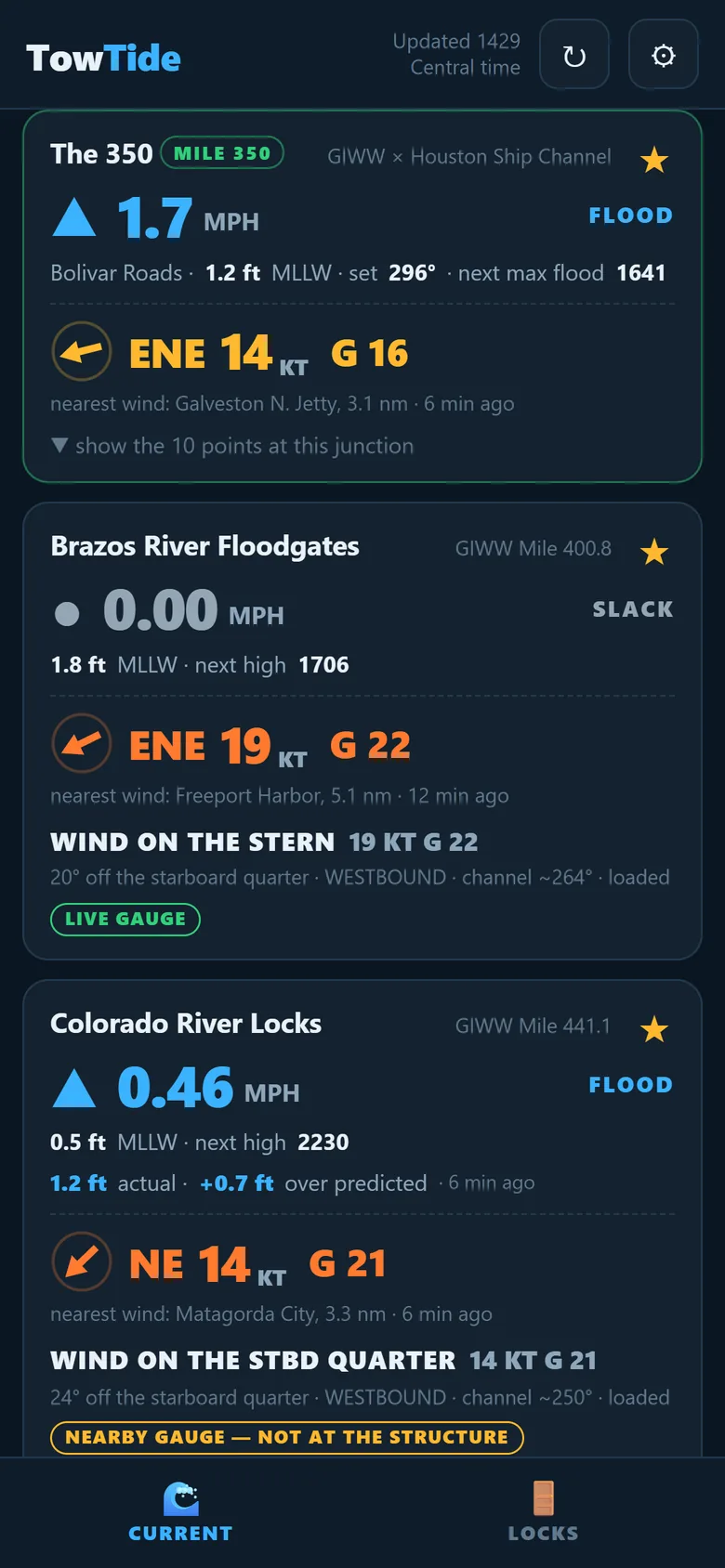
- Big number in MPH: how fast the water is moving. ▲ flood, ▼ ebb, ● slack.
- FT and next high/low: tide height and the next turn.
- Wind: speed and gusts in knots from the nearest station, with how far away it is and how old the reading is.
- WIND ON THE BEAM / BOW / STERN: the side call for the direction you set in step 2.
- Warnings: NWS marine warnings for that spot show in red at the top of the card.
- LIVE GAUGE or GAUGE DOWN: whether the reading is fresh. TowTide never shows an old number as if it were current.
Tap a card to see the 0600 / 1200 / 1800 / 2359 forecast.
5. Locks and floodgates
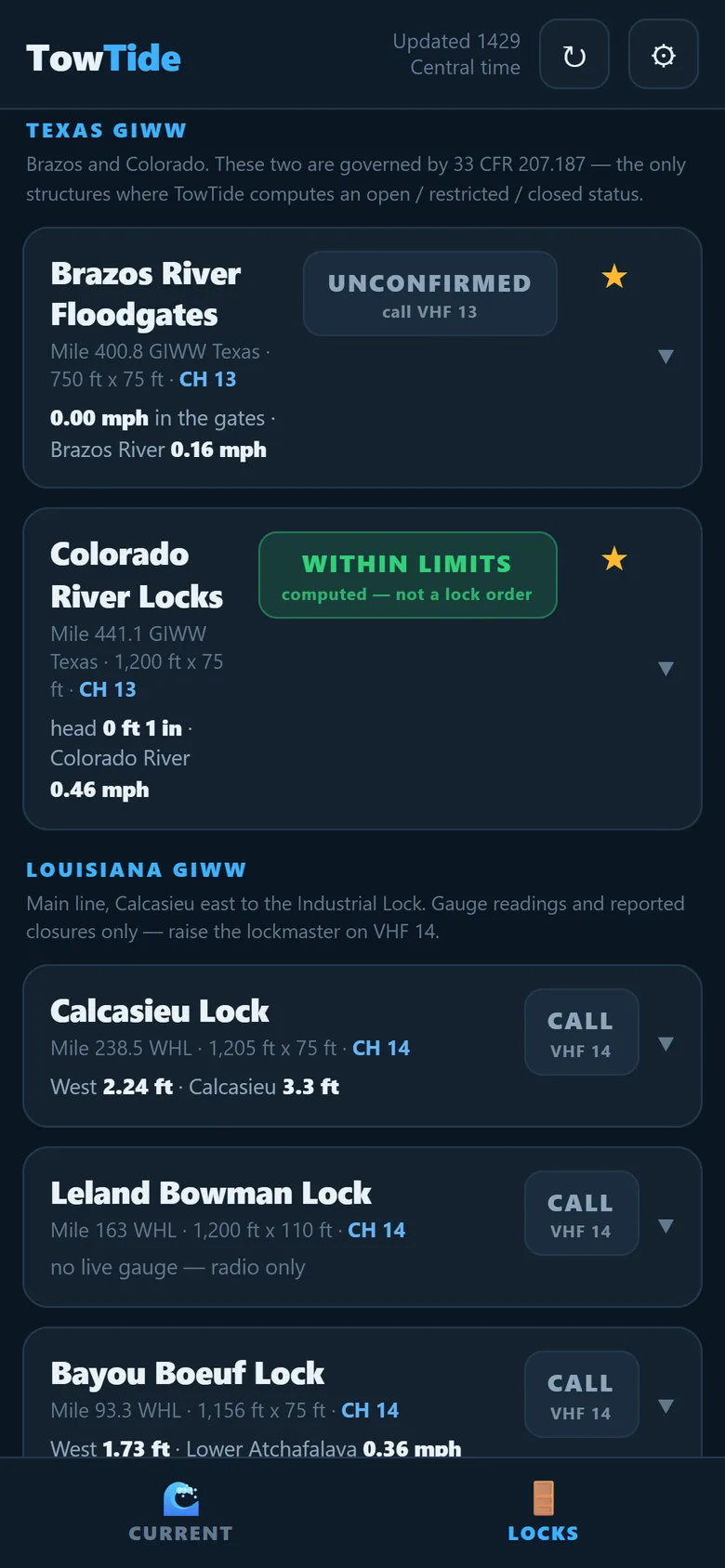
Open the LOCKS tab. Texas floodgates are at the top, then the Louisiana locks east to the Industrial Lock.
| Badge | Meaning |
|---|---|
| WITHIN LIMITS | Both gauges are fresh and inside the posted limits. Computed by the app, not a lock order. |
| UNCONFIRMED | A gauge is missing or stale. Call the lock. |
| RESTRICTED / CLOSED | Limits exceeded or a closure is reported. |
| CALL VHF 14 | No live gauge to compute from. Radio only. |
Tap a lock for chamber size, gauges, current, and the VHF channel.
6. Plan a run
- On the CURRENT tab, tap RUN PLANNER.
- FROM: tap the waterway chip (GIWW, Houston Ship Ch., Colorado R., Chocolate Bayou and others). On the GIWW, pick the mileboard: west of Harvey (WHL) or east of Harvey (EHL).
- Type a mile, like 420, or start typing a place, like Brazos or Bay City, and pick it from the list.
- TO: do the same for where you are going. Typing a place on another waterway switches that waterway for you.
- Set LEAVING (NOW by default) and your SPEED with − and +.
- Tap DONE — SHOW THE RUN.
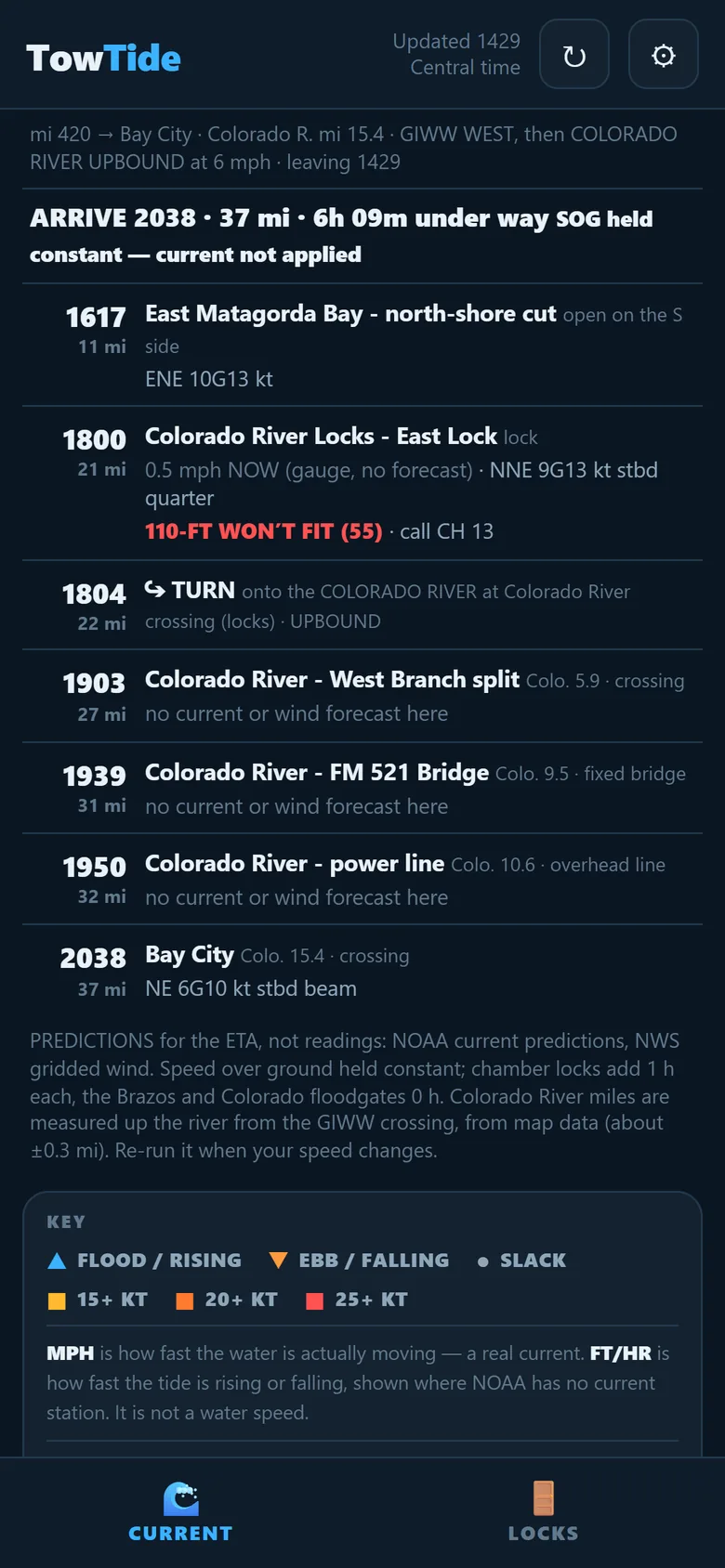
You get an ETA at every lock, floodgate, bridge, turn and crossing, with the predicted current and wind when you get there. If there is more than one way through, the other routes are listed under your destination with a TAKE THIS ROUTE button.
- TRIP BACK swaps FROM and TO.
- Your last three runs are saved as buttons.
- Change speed on the folded summary and the ETAs update.
7. Save your own spots
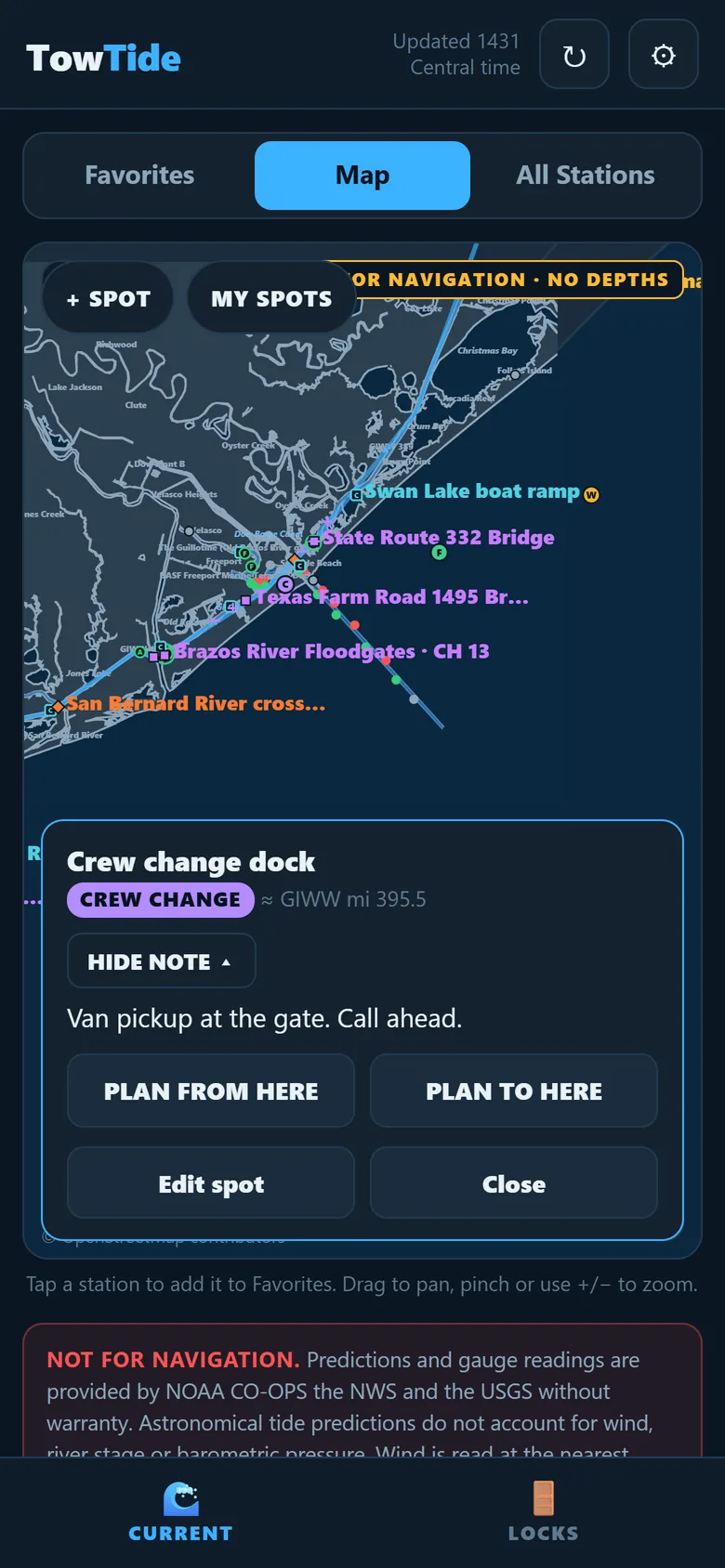
- Open Map and tap + SPOT, then tap the chart where it goes.
- Name it and pick a tag: CREW CHANGE, WAIT, DOCK, FUEL, MOORINGS or NOTE.
- Add a short note if you want. It stays folded until you tap it.
- Tap MY SPOTS to list them. From a spot you can plan a run from it or to it.
Spots are saved on your phone only.
8. TowTide Pro and your subscription
TowTide is a subscription app: everything in this guide is part of TowTide Pro. Pro is a monthly or yearly subscription, bought inside the app through the App Store or Google Play. First-time subscribers get the first month free on the monthly plan. The price for your account is shown on the subscription screen before you buy.
- Cancel or change plans: iPhone Settings → your name → Subscriptions, or Google Play → Payments & subscriptions. Cancel at least 24 hours before the period ends.
- New phone: tap ⚙ → Restore purchases while signed in to the same Apple or Google account.
- Deleting the app does not cancel a subscription.
9. Help
Questions or a station that looks wrong? See Support. Please include the station name and the time you saw it.